Best Software for Mac

We review and pick the best Mac DVD Ripper & Video Converter for Mac for you

Blog | Free Mac Game
Mac Software | Free Mac Resource
Home > Photo Recovery for Mac

Photo Recovery for Mac - Recover Photos Videos and Songs from Mac and Hard Drive

Photo Recovery for Mac
Publisher:

Photo Recover for Mac

Tutorial: Step By Step Guide
Platform All Mac OS X ( Lion included)
Our rating:
 
 
Download Photo Recovery for Mac

For All Mac OS (4 MB)
Buy Photo Recovery for Mac

Original
$59.95 now only $49.95
 
* 100% Clean: No Viruses, No Spyware, No Adware.
* Receive registration code via email immediately after secure ordering!
* Free technical supports within 24 hours (Contact us at support (at) mac-dvd.com)
* 30 days money back guarantee.
 

Photo recovery for Mac First Review


Photo Recovery for Mac is a powerful but easy to use Mac Pictures Recovery App. It can help you recover the lost, deleted, formatted and inaccessible photos, videos and music files. Fully support recovering photos from Mac based hard drive, iPod, iPhone, iPad, USB drive, external hard drive, digital camera and other storage media. If you lost your lovely photos again, Don’t worry. Photo Recovery for Mac will be your best partner to retrieve them.


Photo Recovery for Mac Key Features

 
Recovery Photos Videos and Songs from Mac
  • Recover multimedia files from Mac including Photos, Songs and Videos

    Recover photos from all devices including Mac Hard Drive, Media Storage, External Drive, iPod, iPhone, iPad, Digital Camera, Flash Memory Card, etc. No other photo recovery software supports so many devices.

    2 recovery modes - Deleted Recovery and Deep Recovery
    Deleted Recovery - Recover deleted photos, videos and music files only on Mac hard drive with HFS+ file system.

    Deep Recovery - Deep scan and recover lost photos, videos and music files from both Mac hard drive and other portable storage devices with HFS+/FAT/ NTFS/NTFS5 file system.
 
Keep the Photo original Quality
  • Keep the Photo Original Quality, no compress
    Recover Photos from Mac in original quality, keep the name and information, no compression.
    You can use photo name to search for recovering certain Photos instead of all photos.
 
Easy to use photo recovery for mac
  • Easy to use Photo Recovery for Mac
    Preview of images and camera RAW files before recovery lets you evaluate recovery quality in advance.
    Provide real-time and direct scan results by displaying the recoverable photos during the scan process to let you stop the scan once the target photos are found.
 

Photo Recovery for Mac Software Adwrads

Best Photo Recovery for Mac
 

How to recovery Photos from Mac and iPod


Step1. Select Recovery Mode
After you download and install the Photo Recovery for Mac, launch it. After you download and install the Photo Recovery for Mac, launch it. There are too modes to recovery your files. Select one according to your need.
Deleted Recovery - Recover deleted photos only on Mac hard drive with HFS+ file system.
Deep Recovery - Deep scan and perform Mac photo recovery on all kinds of file systems, such as HFS+, FAT, and NTFS.
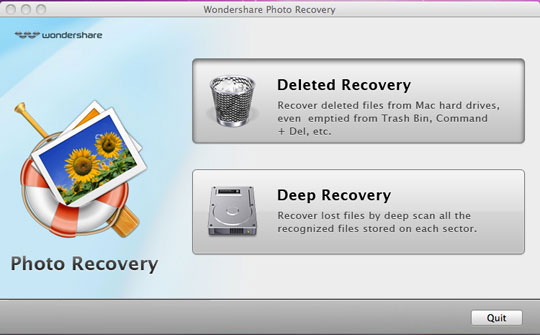
Select Recovery Mode

Step2. Select Recovery Target and Type
Select the device where you want to recover your photos from.
Choose the file type. All types are selected by default. You can click the button to select the types or cancel the selection. Gray background color means the type is selected. Click 'Next' to start automatic scanning.

Recover Photos from Mac

Tips: During the process of scan, if you have already found the photos that you want to recover, you can click 'Stop' button to stop the scanning, and go direct to the next step.

Step3. Preview the recoverable photos
For Deleted Recovery, if you remember the file name, you can search the file by its name to find the target photos precisely in a short time.
For Deep Recovery, you can sort the file list according to size and date.
Caution: The scan results are temporary in memory. If you click 'Back', the scan results will be lost.

Step4. Save your recovery photos
Select or enter a directory to save the photos, videos and music files that you need. For Deleted Recovery, you can recover with original directory. Also you can enter a new entry by yourself.

Save your Recovery Photos

Tips: We highly suggest that you should select a directory that is located in a different partition from the source partition.

 
All-in-one Converter for Mac
 Best Mac DVD Ripper
 

All-in-one DVD Pack
Discount DVD Suite
Mac DVD Ripper
Mac DVD Creator
Mac DVD Copy
Mac DVD Converter
Mac DVD to iPod
Mac DVD to iPad
Mac DVD to iPhone
Mac DVD to iMovie
Mac DVD to Apple TV
Mac DVD to iTunes Ripper
Mac DVD to Zune Ripper
Mac DVD to PSP Ripper
Mac DVD to MP4 Ripper
Mac DVD to AVI Ripper
Mac DVD to QuickTime
Mac DVD to 3GP Phone
Mac DVD to M4A AAC
Mac DVD to MP3 Ripper

 Best Mac Video Converter
 

Discount Video Pack
Video Converter for Mac
Mac Movie Converter
Mac iPod Video Converter
Mac iPod Transfer
Mac iPhone DVD Converter
Mac iPad Movie Converter
Mac YouTube Downloader
Mac Video Editor
Mac Slideshow Maker
Mac Photo Editor
Mac Photo Recovery
Mac HD Video Converter
Mac MP4 Video Converter
Mac AVI video Converter
Mac MKV Video Converter
Mac MOV WMV Converter
Mac FLV Video Converter
Mac TS MTS Converter
Mac Video to MP3 Audio

 Best Windows Software
 

All-in-one DVD Pack
Win DVD Ripper
Win DVD Converter
Win DVD Copy
Win Video Converter
Win DVD Burner Creator
Win DVD iPod Converter
Win iPod Transfer
Win DVD iPhone Converter
Win DVD iPad Converter
Win DVD MP4 Converter
Win DVD to AVI Converter
Win Blu-ray Ripper
Win YouTube Converter
Win DRM Remover

Copyright 2006 - 2011 mac-dvd.com all rights Reserved    Privacy - Contact us - Links - Sitemap

We provides the best Mac software including DVD Ripper for Mac, Video Converter for Mac, Mac DVD ripper, Mac video converter, Mac DVD to iPhone converter, Mac DVD to iPod converter, Mac MP4 video converter, DVD Burner and DVD Copy for Mac, DVD Converter for Mac OS X.